WordPress iSell is an easy to use WordPress plugin to sell digital downloads from your WordPress site (for free). This plugin is designed to do one thing only but do it really well, which is to sell digital downloads from your WordPress site via PayPal.
WordPress iSell Plugin Features
- Sell any kind of digital downloads – sell ebooks (PDF files), sell photos, sell music (mp3), sell videos, sell podcast etc.
- The plugin instantly delivers the digital download to the customer after purchase by sending an encrypted download link via email.
- Very secure file downloads using an encrypted file download system. The real location of your digital download is never revealed.
- Sell digital downloads via PayPal (the money from the sales will go right into your PayPal account)
- Create unlimited products
- You can also create custom orders
- Ability to upload large files for products (this plugin has a file uploader)
- Manage products and orders through standard WordPress User Interface (UI)
- The user interface is very easy to use
- WordPress iSell is a developer friendly plugin and very extendable (it has many hooks that you can use to extend the plugin)
- You can customize your Buy/Purchase button image. This is handy for using it on a landing page
WordPress iSell Installation
- Go to the Add New plugins screen in your WordPress admin area
- Click the upload tab
- Browse for the plugin file (sell-digital-downloads.zip)
- Click Install Now and then activate the plugin
WordPress iSell Setup
When you install the plugin, it will create the necessary WordPress pages that the plugin needs to function correctly.
It will create the following 3 pages (don’t delete these pages). You can edit the title of these pages from the wordpress’s page editor (don’t change the URL of these pages).
#1) Thank You – This page is used to thank the customer for the purchase.
#2) Transaction Error – the Transaction Error page with the following shortcode embedded in it:
[isell_errors]
If something goes wrong with the transaction your customer will be able to see the errors on this page.
#3) Product Download – One Product Download page with the following shortcode embedded in it:
[isell_download_page]
This page will be used to serve downloads to your customer after a successful transaction.
WordPress iSell Settings
Go to the iSell Settings menu from your WP admin dashboard.
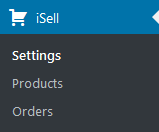
It will take you to the Settings menu of the plugin.
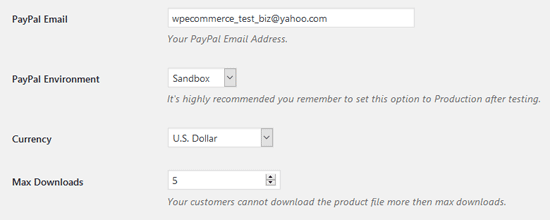
There are various options that you can configure here.
PayPal Email: Your PayPal email address where the payment will go for each transaction.
PayPal Environment: You can either do the transaction in sandbox mode or live mode. Make sure to set this option to Production when your site goes live.
Currency: The currency that will be used to accept the payment.
Directory: The directory that will be used to contain the downloads. The plugin automatically creates the directory when you install it. It gets created in the root directory of your site. If the directory doesn’t exist you may need to manually create it. Make sure that the directory is both readable and writable (0755 permission).
Max Downloads: The number of times your customer can attempt to download a file.
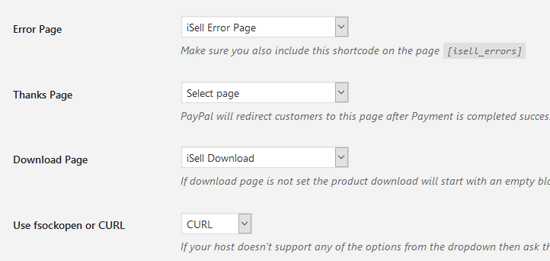
Error Page: Select the Transaction Error page (this should already be set for you)
Thank You Page: Select the Thank You page (this should already be set for you)
Download Page: Select the Product Download page (this should already be set for you)
Use fsockopen or CURL: Select the method that will be used to validate IPN (Instant Payment Notification) with PayPal. If your server doesn’t support either you need to contact your hosting provider and have them enable one for you.
Click on the Save Changes button to save all the options.
WordPress iSell Product Configuration
Now that you have the settings configured, you can start creating new products. Go to the Add New interface from the products menu of the plugin.
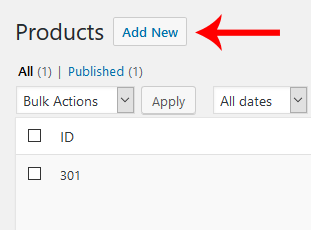
Enter a name and price for the product.
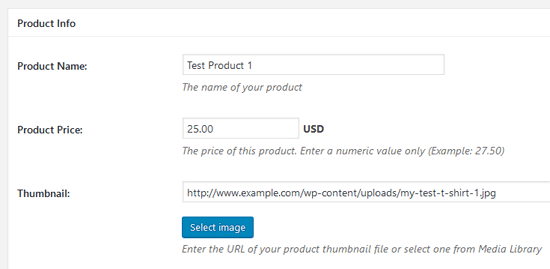
A Buy Now URL for this product will be automatically generated for you. You can use this as a destination URL for your Buy Now button image (It means when a user clicks on the button image they will be redirected to PayPal to make a payment for this product).
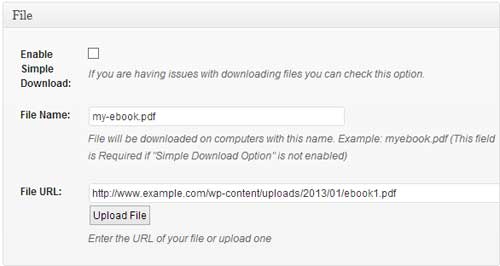
In the File section there is an option for you to upload your digital file. First, select the file on your computer and hit the Upload File button. Alternatively, you can upload the file via FTP and specify the URL in the File URL field. If you are using the default download option (Enable Simple Download unchecked) you need to also set a custom name for your file in the File Name field. Your customer will see this name instead of the actual file name while downloading the file.
Click the Publish button to save the product.
Using the Buy Now URL on Your Landing Page
You are almost done with the setup. Now all you need to do is use the Buy Now URL on a WordPress post, page or landing page. You can use the Buy Now URL for the product to insert a text link, image or a button. It’s totally up to you what you want to use. You just need to make sure that the destination URL (The URL where the user will be redirected to once clicked) is set to the Buy Now URL of that specific product.
Once a user makes a successful payment, they will receive an email containing the digital download link.
You can always view the details of a transaction from the Orders menu of the plugin.
Using the Buy Now Button on Your Landing Page
The plugin also has a shortcode that lets you create a Buy Now button for the products that you have configured.
Below is an example shortcode usage that will create a buy now button for Product ID 123.
[isell_buy_now id=”123″]
This shortcode will create a buy button like the following screenshot (the style of the button comes from your theme):

This button can be placed on your landing page of the product.
That should be it. You are now ready to sell digital downloads from your WordPress site using the WordPress iSell plugin.
If you have any issues with this plugin please post it on our support forum.
Hi,
I would like to know if this plugin come with french translation!
Thanks in advance for your response
@Stephane, currently there is no option for the french translation. But we are planning to add this option in the future.
Hi! I have problems when i try to upload the files to “Products”. I created the directory in ftp folder, but when i upload a file this message appears: Failed to open output stream. The directory has the same name as the directory in “iSell”, and permissions 777. With 755 this message appears: Failed to open temp directory.
What I’m doing wrong?
I get this warning:
Warning: include(/home/hopevv/public_html/wp-content/plugins/sell-digital-downloads//views/custom_edit_icons_style.php) [function.include]: failed to open stream: No such file or directory in /home/hopevv/public_html/wp-content/plugins/sell-digital-downloads/inc/functions.php on line 312
It goes away when I deactivate. What’s this about?
Hi, It’s just a warning. It will not affect the functionality of the plugin. However, we are working on fixing this issue.
Hello,
Having some issues with orders being placed and the link going to error page “Transaction ID is invalid”.. You did some customization to this plug-in for me previously.. I have not updated from Version 1.3 as instructed… It doesn’t seem to happen on every order… the most recent order had the error.. [garygulman.com/?page_id=548&isell_error=1]
Please advise,
Steve
Hi, We have released another update. You shouldn’t see the warning anymore.
How does the customer get the downloadable file he just paid for?
The plugin automatically sends the download link via email. However, on some servers the email may not get sent out due to restrictions. In that case, you will need to manually send the download link.
I installed the plugin and like the features a lot… however, after installing, the settings menu (shown in your screenshot under orders as “iSell”) is NOT showing up in my WP admin menu. I can’t get back to the settings now to change my payment gateway from sandbox to live. Help!
Did you log in as the admin? Do you have the “editor” permission?
Thanks for this plugin….I am just looking for a good way to make digital downloads of high-resolution photos available to press and other interested parties, but for free, so is there a way to configure this plugin to allow the downloads for free, and without having to activate the store/paypal functionality?
scott
Unfortunately, It’s not possible to offer free downloads with this plugin.
Hello, I installed the plugin but not download the digital file … even if the amount charged. Only rarely have been downloading, but the file without extension low (epub).
Thanks and merry Christmas
everything appear to be working but the buyer does not get a link to download the file where did I go wrong?
Stupid question: I’m wondering if this plug in keeps people from being able to share the file. When you say encrypted, is that what you mean?
Hi,Thankyou for this plugin.I Have installed but I have some questions.
I created a product,its ok but how to include into the post?Need to make it manualy?
Hi, a “Buy Now URL” is automatically generated when you create a product. You can use that URL in a text or button image. When a user clicks on that image/text they will be redirected to PayPal (it works just like a buy now button).
Hi, that plugin sounds great. Can you use it for selling ePUB files, too? In the description only PDF is mentioned for ebooks.
@sundi, you should be able to sell any type of digital file.
when I create the Thank You, Download and Error pages, they show up on my WP site main menu, how do I prevent this? If I make them private, they do not appear in the dropboxes on the iSell config page.
@egnola, It’s probably because your theme automatically adds recently created pages to the navigation menu. WordPress also has a custom menu option that allows you to select the pages that you want to show on the navigation menu.
Dig the plugin. One question. The checkout process on paypal asks for your shipping address but since we’re doing a digital download, is there any way to turn that off?
@Benjamin, unfortunately there is no option to turn that off in the plugin since the checkout form is displayed by PayPal.
Hi, I have set this up exactly as instructed, everything is working except that the customer is not receiving any download link after purchasing
Please help,
Regards,
James
@james, you will need to manually send the download links after the purchase.
Is there a size limit to the files I upload? I’m trying to put some larger mp3’s up and it keeps saying “undefined”. But everything’s been working fine with smaller files (small mp3’s and pdf’s). Great plug-in overall!
@chugo, What is the size limit for your WordPress uploader?
It seems to cap between 5MB and 6MB. Is there something I can do to fix that?
I generally have been uploading files on Cyberduck; that lets me upload as big a file as I want and is how I usually upload files. But for this I’ve been using the iSell interface and I’m inexperienced in uploading directly into WordPress. Is there something I need to do to my WordPress site then?
@chugo, you might need to increase your Maximum upload file size
I want to sell art lessons. Is there a way instead of uploading my video lessons to my website but having them hosted from another site like Vimeo? Once they’ve paid for the lesson a link and password would be sent to them or it would show them the download link on the current page they bought it from.
@Marc, currently you can only sell products that are hosted on your site
You can deliver a link to an html file hosted on your site or elsewhere that has a password and link to a second page where the password can be used. When the password protected page opens (like a password protected weebly page) on that page you can display videos hosted wherever you like as long as that host’s terms and conditions of use are not violated. You can deliver a page that simply shows the videos which are hosted on a page within WordPress and skip the password, too. Use the Hide Page plugin to prevent your thank you, transaction error, and download pages from being visible, or being indexed by Google! If you are delivering an html page hosted somewhere, or just a page on your site, you can use the page for upsells, or free bonus items, newsletter signups, etc …
Hello, I think this plugin is the one that I need to sell my product, but right now I’ve got an issu with it.
I configured everything like shown just above but when I test it with the “sandbox” from Paypal nothing works.
The link is not given on the “product download page”, no email is sent, and nothing appears in “orders” in the wordpress board.
i probably miss something, so if someone has some idea, feel free to help me !
@Mathieu, have you updated to the latest version of WordPress and the plugin?
Yes, I’m working with wordpress 3.5 and 2.1.1 for the plugin
I like the plugin, but I’m running a membership site and I like to keep from Arther on down from getting at the Products and Orders menu’s in there dashboard or limiting it to admin only.
Is there an easy way to do this or point me at the section to drop in a user level code.
@Dave, hi currently it shows menu to the users who have the permission to edit posts.
I’m selling larger files–over 1GB each. When a customer tries to download them, the download terminates after only 82.4MB have been transferred. Is this an issue with the plugin? With WordPress? With my web host?
At first the download link was not being sent, but changing the method from CURL seemed to work.
I am currently testing in PayPal sandbox and trying to figure out how the download link is working.
The customer completes the transaction and returns to the Thank you page. PayPal shows a receipt email for the customer and a notification of payment email for the buyer. Because I am using the sandbox I can’t get an email with the download link, is that right? Also if I wanted to re-send the download link to the customer, the only place it is available is in orders. However, the input box where it is displayed is disabled and I can’t copy it from there. How would I find out what the link is?
@David, You won’t receive the email in sandbox mode. However, you should be able to find the download URL from the order menu. So go to “Orders->All Orders” and select the order you want to edit (click “edit this”). You will see a “product info” box which has the “Download URL” field.
Hello, I am working on a store for a customer and I need to upload a massive file, I haven’t even tried yet but I know it’s going to cause problems with the filesize limit and such, is there other ways of uploading giant files (+3Gb) Is there a way of uploading the files via FTP and inserting the URL somewhere?
There is a new update for the sell digital downloads plugin. Users should be able to upload files via media uploader or FTP now. If you are having issues with downloading large files simply switch to the “Enable Simple Download” option.
Thanks for the add URL function, I found it very useful and I’m uploading the file via FTP right now, however the new update disables the “insert image/insert gallert” function in my Wordrpress. I am not sure if I am the only one but I tried everything else to fix this issue. The only way I can get it to work is by disabling the plugin. Is there any work-around?
@ReDCroW Design, we are looking into this issue.
Thanks a lot!! 😀
Hi
When creating the following pages:
1. Thank You –
2. Transaction Error –
3. Product Download –
do we publish them, pending review or draft
@m, you need to publish those pages
when I publish them they simply show up as pages in the blog visible at all times to viewers.
Hi, this happened to me too, and I added a Hide Pages plugin that took care of it!
Publish them.
is digital media secure? Can folks hack and steal the media?
TIA for your response!
@Doug, the images are rendered from the WordPress Gallery. It’s a core feature of WordPress so the plugin is not responsible for making them secure.
HI! I am running into an issue that may be indirectly related to the plugin (which I was able to implement easily and is the functionality I needed :). I am using WordPress version 3.5.1, and when the plugin is activated I am unable to insert media into my blog posts. When I tried deactivating this plugin, all worked normally. I have also tested with multiple themes. Do you have any thoughts on what may be causing the issue or where I can look to troubleshoot? Has this been an issue for anyone else? Let me know if any additional information is needed and thanks ahead of time for the help and all your hard work!
Hi, we just released an update to fix the “media uploader” issue.
Whoo hoo! Beautiful. 🙂
We have a realy big file (10gb) and we never succeeded to finish the download!.. (it stops downloading, sometimes at 10-15Mb sometimes at 1-2Gb.. What can be the problem? Any ideas?
Hi, have you tried the “simple download” option? It has been recently added to the plugin. So if you don’t see this option in the Products menu you might need an update.
yes we did. It has only worked once! i also want to ask you if our custommers can use download managers? if so do we have to increase max number of download field? (because they use multiple simultaneus connections) May be there is a “time out” option that we cold not see!.. I don’t know.. Do you have any suggestions? Thanks..
I also heard that we may need something called Xsenfile support. Does your plugin have such an option?
Is the download link delivered right after redirection to the “Thank you” page or should I wait until my paypal transaction is completed?
Hi, the download link is provided via email and will only be valid after the transaction is complete
Is it possible to use this plugin to sell one custom digital product to one customer only?
@Michelle, Unfortunately it’s not possible with this plugin.
Is there an option on the sales page to ask the customer where they heard about your products for market research? A drop box of radio box…..
@Julie, the plugin doesn’t have any template for the sales page. It’s something you need to do manually. However, there is a “call to action” shortcode that comes from the plugin for each new product you create. You just need to use that shortcode as a “Buy Now” link (it could be an image/text). But it’s totally up to you where you want to embed it.
hey, I set up iSell products by ftp’ing the files (zipped) to a folder on my host. I created products by linking to the URL in the creation page and published. I did some test transactions and received email notifications (both admin and customer) I was also redirected to the “Thank You” page.
I received an email notification with the download link. I went to the page and clicked download now link. I received a “Error Page Not Found” page with the actual file path to the file listed in the browser URL. I tried with an mp3 I uploaded through the create product page. Everything worked as before, but when I clicked on the “Download now” text, I was taken to a page (with the file path to the mp3 in the URL address) with the mp3 that I could play but not download or save. I right clicked, file save, and everything else I could think of. what’s happening and why is the download showing the file URL. This opens the system up for exploitation!
@Doug, do you have the “simple download” option enabled in the “create product” page?
Hi,
I just installed iSell and no directory was created in root. Also. there is no field in the settings to set a directory. Am I missing something or have things changed with updates?
Lou
Was me. Too much coffee. Thanks. Sweet plugin. I’m sure there’s good things coming.
Lou
Hi..
Does this plugin have a mp3 playing to listen to snipptes of the song before purchasing?
Thanks
Hello,
I’m interested in your plugin but I have some questions:
1) Can I create static purchase links? (I’ve already my order now image button and want the users click on them)
2) I have an Italian account and want to create purchase links for people from US in english…so having a paypal page in Italian is useless. do your plugin can handle this paypal purchase page customization (country/language)?
Thx
Hi,
Thank you in advance for the plugin.
When I try to install the plugin, the Dashboards return a message saying that it can not be activated due to a fatal error. Any sugestions?
Ok. I’ve double checked everything, but when I hit the Buy link it just refreshes the page I’m on even though the link clearly shows the product ID link created when adding the product. It does not go to PayPal. Any ideas?
Thanks,
Lou
I did everything the tutorial said but it didn’t create the “directory” on the settings page. Now it can’t find the file for downloading.
Please, what should I do now? Thank you.
Am having the same issue. Receive the mail with link which goes nowhere. Have created the directory, set the permissions to 755 and installed the file there, but still no workie.
I have just written an eBook and wish to sell it from my website. Inside the eBook, I have a link to a separate page where I outline some substantial discounts for customers who wish to purchase additional copies. I don’t want these discounted prices to be seen on the main purchase page.
Will I be able to set up the first sale, a normal PayPal purchase action on one page and then use the plugin on the second purchase page for the discounted prices? If the plugin cannot accommodate this, could you suggest a way that I could do what I want?
sincerely,
Graham Segal
I am having just a little trouble with this plugin, I have two questions.
1) wordpress wouldn’t allow me to upload this file because it was too big, so i used filzilla to upload it to my FTP server. now that i have it on my server how do I access it to use with this theme?
2) is there a simpler way to do this for large files?
Thank you
I have installed this on my site, but i never get the customer or admin e-mails from the plugin.
What can i do?
Hello! Thank you for your plugin! It’s great!
But I have one question: how can I change sender name from WordPress to another?
If buyer receives download by email, how can he read it in a reader?
Do I have to put the WordPerfect file in some other format?
Hi,
I am still having the problem-when I create the 3 pages, they show up on the website itself as a normal page, viewable to users at all times. Am I missing something here?
Hey, install the Hide Page plugin!
Hello Admin
is it possible to use an affiliate system with the isell plugin?
regards
Hans
Hello, awesome plugin. It was surprisingly simple to setup and implement. I don’t really have a problem, just an inquiry. I have your script on my site and everything is working well, I just wanted to know is there a way to change the email that sends the info? For example right now it says wordpress@mysite.com. I would like the e-mails to be sent from sales@mysite.com. I didn’t notice anywhere in the setting to change this. Is there a code “work-around” you can give?
TIA,
-Skipp
Hi! Can I upload the files to Amazon S3 and then link to them for the download?
Thanks!
Hi, yes you can. But you will need to use the simple download method.
Hi, can I upload two files ie MP3 and PDF in the same product? I need the PDF to explain the MP3.
Thanks for a great plugin.
Hi, May be put them in a folder and zip it.
Hi,
This plugin is just what I need and simple to set up, however, it doesn’t really work. I created a test product, or two, paid for it ($0.10) at PayPal, and then nothing happens for the purchaser. The order goes through to the WP ‘Orders’ panel, but that’s it.
So, if I have to email the link to the purchaser, then they can just share that link with whomever they like and they can download the product for free.
Sadly, I will have to try something else.
Hi! Really great plugin. I just went through my purchase process to make sure everything was working correctly, and it does, except when I get the final email with my file download, the “from” field says WordPress. How do I get it to say my name instead?
Thank you so much,
Amanda
In case anyone is still looking for this, you need to add this code to the functions.php of your theme:
add_filter('wp_mail_from_name','from_mail_name');

     function from_mail_name($name) {

        return 'YOUR NAME HERE';

     }
I noticed a few others have asked this but haven’t seen an answer. I installed the plugin, followed steps. No directory shows up on the isell settings page. The directory was created, I can see it via ftp. I can make a payment but no email arrives, is it because of the missing directory setting?
I’m having the same issue, however i received a payment confirmation from paypal and when i return to the merchant’s website for the thankyoupage with the link to the download page i can’t see the download link for the product, i already tried everything that is possible but still can’t see the link to download.. already tried to put the [isell_download_page] in the thankyoupage and Download Page to the samepage as the Thanks Page but still can’t see the download..
Hi
I have received the email confirmation, its just something with sandbox..its not receiving the emails, so what i did i made a sandbox account with a real email account, and my real email account recieved the email instruction where to download the file,,, however the title of the email is WordPress [admin removed the email address]
how can i customize the title of the email? is there a way that i can change the wordpress title to what i want? thanks in advance… Awesome plugin!!!
Hi, currently the plugin doesn’t have any option to customize the email. I plan to add an option in the future release.
Plugin Developer,
I understand that the plugin does not come with a form field to easily change the name that the download email is sent from.
But, I’m guessing that I can go directly to the code and change the default email name from “wordpress” to whatever I want.
Please give me the short snippet of code which specify what the email name should be. This way i can change it from wordpress to whatever I want.
Thanks
Hi,
Nice little plugin, does just the job.
Have you had any luck on customising the email sender field, ie changing it from WordPress to something else?
I’m likewise happy to change code on the site, if you point us in the right direction.
I’m also having issues with logging into Sandbox (I do have developer account) but can live without the testing as I just put a payment through live.
Thanks,
Lenka
Hello,
I just installed the plugin, created a product, error pages and download. When performing a test, the button brings me to the paypal page, make the payment, when the payment is successful, paypal page not redirected to the download page, it just says that the payment was successful, without any link or any email giving instructions on how to download the product, how I can fix this?.
Thank you.
Hi,
I got everything setup as instruction and enable Paypal Sandbox.
When I test, the page direct to an error page of Paypal which show :
Data does not match input character set or default encoding
My site are in Chinese (UTC-8) Is it caused problem?
Thanks
Kay
I have everything set up as directed however the download page just shows a email box. Is there a way to imbed the code that I don’t know about except for posting it on the page?
I am using iSell with my wordpress site and after getting it all set up using your instructions (which were extremely helpful, by the way!) I try to do a test purchase using the “sandbox” mode. It will take me to the page showing what I am purchasing an my paypal login info. However, it won’t let me log in with my account, either in sandbox or production mode. Do i need to create another paypal account that doesn’t match the one I am using in my WP to sell with?
Thanks…
You need to have a developer paypal account on develop.paypal.com
I have the same problem as above everything works until the download and there is no link…. It says the order is successful and my paypal is charger but no down load link… This seems to be a common problem … would you please address it asap.
The problem seems to be in access to the downloadable file. There is mention of FTP up load of files but neglects to say to what folder to up load them to….. Clarification please
Installed the plugin and working (tested in sandbox only). Anyone has solved the wordpress issue yet?
Another question. The customer only can pay with a paypal account? ’cause I don’t see credit card options in payment page.
Hello! Do you have any idea why some of the products (which are MP3s) download successfully while others, set up exactly the same way, do not? The email arrives, and the link to the download page works but the download does not start automatically. When I click on “If your download does not start automatically, click here”, I get “Page not found”. This happens on some of the MP3s, but not others which work fine! It’s a total mystery!
I enabled the “simple download” function but that just made the MP3 play within the browser but did not give me the option to save it, so that’s not really a good solution. (But the MP3s DID play, so the media is there and valid)
Any ideas? I’m totally stumped!
Hi, if the browser can play the file it automatically starts playing it instead of a download popup. You will need to right click and select “save as” to download it.
Thanks for your answer! But the problem is that I *want* the download popup. I have six songs available as MP3s for sale– Two of them prompt a “save as” popup, but four of them get a “page not found” error. They are all set up exactly the same so I can’t figure out why they don’t all function. It’s a frustrating mystery! Any ideas?
I fixed the above problem — it was due to file size of the MP3s!
But now I have a new problem. When you buy some of the songs, you get an email with the link to download. But the other songs, when you buy them, you get an email but it is BLANK. Any ideas?
What is the maximum file size for mp3?
@apexbee, there is no file size limit.
I have the same issue as most people. Everything works except no download link on any page and no email sent other than from paypal. I would love to use this plug-in but it seems as if this issue is not being addressed.
@Steve, Do you see the “Payment Status” as “Completed” under the Orders menu? If you see it that means the plugin successfully received ipn from PayPal and updated the order (which includes sending email with download links). There can be many reasons as to why you are not receiving the email on your end. For example:
1. It’s going to the spam folder
2. It’s getting lost somewhere after wp sends the email
3. Your server is blocking it because there is a daily limit on how many emails can be sent
4. Some external plugin is doing something
and so on.
Thanks for your response. To answer your questions:
– The order does not show up in the orders menu.
– Spam folder is empty.
– I’m not sending any emails as my site is unadvertised at this point, so there shouldn’t be any email volume issues. Also, I have a free download and that’s working fine.
So I’m still at a loss as to what the issue really is.
Much the same problem as Steve. In my case the Paypal payment is made, but no order is reflected under the “Orders” section and no email arrives. Where might the problem be? I can’t let this go live if client’s money is taken and no download is sent.
Hi, and thank you for such a great plugin. I set up the plugin, everything works fine, but the order is pending, and I am getting the success message from Paypal after testing in Sandbox Mode.
So my problem is the order is pending, and no email with download link arrives.
A little help please.
Cheers
The plugin is really easy to use, however I’m seeing the same problem as a few others are reporting: purchases through the sandbox work, however the order is left pending and no emails are ever sent.
I have installed this plugin and am trying to set up. In the ‘Settings’ section there is no ‘Directory’ input box, so I don’t know where the files are saved, if at all. I cannot seem to access them.
I also had to install another plugin to extend the MIME types which WP will accept otherwise ebook files cannot be uploaded.
Mike, how did you get the “Directory” ? Mine is missing also … 🙁
I have the plugin working now but testing in PayPal sandbox is not completing properly.
An order is received and shown as pending but no email of confirmation or link to download is sent. I have tried opening the order and changing the status to completed but this doesn’t seem to make any difference.
It looks like this is the same problem found by a lot of potential users of the plug-in but nothing is being done to resolve it. Does anybody respond to these comments/complaints? Where else can we go for assistance?
@Mike, you probably set up so you need to manually approve each transaction on your PayPal account, which is why the transaction is pending.
Hi @admin, I’m using Sandbox and process the payment correctly in PayPal (sandbox), but my order also gets the pending status.
I know this is not a plugin questions, but a PayPal question… but the answer to this is the key to help many people who are having issues getting this plugin to work. How can I update my PayPal (and my sandbox), so I don’t need to manually approve each transaction?
Nevermind,
I’ve found that my sandbox receiving account was in USD, while my product was on AUD. I’ve created a new sandbox account with default AUD currency and now the payments don’t need to be accepted.
The plugin is working properly now 🙂
Hi man. Congrats for this plugin, it’s simple to use, and I love that it’s not crafted with million of unuseful features to make your life harder. :).
@HeroWP, thanks. It means a lot.
This sounds nice, only the payment form is a bit restrictive.
Is it possible to add a bitcoin payment possibility for digital downloads?
Digital Products with Digital Payment is what I’m looking for.
Thanks,
Paul
Hi,
Everything with this plugin has been working great (!) but I do have one question:
Is there a way to change/customize the “sender information” for the email that is delivered to the customer? Right now it has a generic email address with part of my domain + bluehost.com. Is this a setting that I can change in the plugin? Or is a change I need to make within my WP settings itself? Right now I do not have a WP/admin email address set up….
Thanks!
Hi!
I think this plugin will be great for me to sell trough my website.
It seems that it’s quite simple for people who are using Paypal to purchase. But is there an option that if customer pays the price other way, for example using normal bank payment, I could generate and email the download code to customer after I’ve seen the payment on my bank account?
Thanks:)
@Timo, currently there is no bank payment option in the plugin
Awesome stuff! Does your plugin offer password or key generation for each purchase of the downloadable files? What about multi-vendor setup?
@Kevin, thanks. Currently there is no option to automatically generate a key/license after the purchase.
After having solved the problem with not receiving an email with a download link I now have the problem that after clicking the link I come to the download page. Clicking the link on the download page brings the error “Website could not be found”.
The file name has capital letters in it – could this be the cause?
Thanks!
Solved. Checked the “Enable simple download”
Hi,
I have the need to offer two digital files for download in 1 sale. The files are ftp’d to the server but there is only room for 1 url. Is it possible to add multiple url’s to the files?
Thanks,
Don
@Don, currently this feature is not available in the plugin. You might want to try the WP eStore plugin which allows you to configure multiple urls in one product.
@Don. Have you tried zipping the 2 files into one self extracting file?
My directory is missing how do I get it in the Setings?
Hi I’m working for a client who wants to sell a song via paypal on his wordpress constructed website it happens to be a .wav file but that is neither here nor there. Obviously we want the thing to be secure and after investigating several methods of doing so we found your plugin it was easy to set up and get going but I am experiencing the same problem as many,
When test buying the song. I get taken to the paypal page, and am sucessfully able to purchase the song/ get a confirmation email from paypal, but do not receive any sort of email with a download link, am not redirected to any download link and the purchase does not appear in the orders pane.
I’m not sure if the client has enable IPN message receiving in his paypal account. If this makes a difference . I see that a number of people have reported similar problems. I’d really like to be able to use this plugin. So any sort of help on this issue would be appreciated.
@Radek, the plugin now has the debug functionality. Please enable it in the settings and do a purchase afterwards. The log file should show exactly where it’s failing.
Hello,
I really love the idea of this plugin but I am not able to get the download link to slow up. The paypal payment was made (and confirmed), the email arrived but the link went to the transaction page which said the product does not have any files. I uploaded all of the Mp3 files to the products folder as advised. It says they are not attached. Should they be attached to the products download page?
Has anyone found a solution to the missing directory problem? I notice many people have had this problem and some have resolved it. Would those that resolved it mind sharing the solution? That would be very helpful as well as a bit community spirited…:o)
@Terry, if there is no directory that means the plugin was not being able to create it on your server. Please enable “simple download” method and upload it using the “upload file” button.
I sell huge files. Is there a way to refer to an external file instead of using the default WP files structure?
@MIke, you can directly specify the URL to your file in the “File URL” field instead of uploading it
I have created a Transaction Error Page and a Download page, but when I click on the pages nothing they are both blank even though when I click to edit, the code is there.
@Noreen, by default the pages will looks blank on the front end.
So the code was supposed to go into the body of the page. That is what I did.
But what I am saying is that when I made a real payment, no email showed up to direct me what to do next. I did get to the Thank you page. Is there something that I am supposed to include in the Thank You page? Right Now I am directing them to Download. More instructions would be great.
@Noreen, have you enabled debug in the plugin settings? It should reveal more information as to where the email is going.
I’m interested in using this plugin to sell issues of a digital magazine. Does iSell support monthly/yearly subscriptions?
Did not receive email to download during test.
Hi, I installed the plugin and went though all the setup and settings. Everything works correctly but the digital download to the customer after purchase by sending an encrypted download link via email is not working. I can click the Buy Now button on the item to purchase, it will take me to PayPal, I make payment and when completed it will take me to the Thank You page. The download link via email to the customer after purchase does not arrive. I checked my Spam/Junk folder also.
I am using Wordpess 3.91. I have tried both fsockopen and CURL.
Mine is not working. I have it in sandbox mode now but have tried it in both modes. could you look at it and tell me what I did wrong? I confirmed that CURL is enabled on my host.
http://highschoolwrestlingmatches.com/elbow-pass-get-five/@Curt, CURL is the second option. Have you tried it with the default option “fsockopen”? You should also enable debug in plugin settings.
I tried both and it did not work. Debug is enabled and CURL is now set.
It just takes me to a Paypal thank you page, NOT the one I designated in the settings and it does not email the download link.
@Curt, I just checked your log. It looks like PayPal is sending a “pending” payment status in the IPN. The plugin will update the order only if the payment is cleared.
Hey guys,
I am having some problems with the directory as well. Everything is working well – EXCEPT the file do not start to download once the purchase has been made and the email with the URL link has arrived. I click the link and NOTHING happens(!)
When I upload the files through the ‘iSell settings menu’, the files go into a folder named ‘uploads’ and it contains sub-folders specifying years and month. There is also a folder named ‘ebooks’. These are all contained in the ‘wp-contents/uploads’ folder. However, no matter where I place the files and specify the URL link to that particular location under ‘products’, I can’t get the files to download.
I have adjusted the permission settings to 0755 in all folders.
Can anyone tell me where in the file directory the folder for the downloads is best stored? I am not sure what folder iSell created in the directory when the plug-in was installed. It might be that I am storing the files in the wrong location in the directory.
Help and advice is much appreciated. Thank you in advance.
Thanks for a great plug-in. Good work!
@chris, have you enabled simple download option for that product?
download does not works, orders are not being recorded in the orders post type.
Great plugin. It works fine for my Ebooks. But there is a little error:
After clicking the download link, the pdf is opened in the browser and the real location link is visible. That shoudn’t be happening…
Kind regards
please kindly help me out, i just activated this plugins. if you check my site, you will notice that isn’t working well enough. Maybe i get it wrong in the embed iSell shortcode. Please help, am a newbie
@wesley, what sort of issue are you having? The plugin automatically generates a “Buy Now” link for each product. You can view it under “Products->All Products”. All you need to do is use it to link a text/image:
https://en.support.wordpress.com/links/Hi! Does this plugin have a shopping cart capability, i.e. can someone buy/download multiple products with one transaction?
Thanks!
@Mila, It does not have shopping cart capability unfortunately.
Thanks 🙁
@Mila, There is a free shopping cart plugin that you can use. It’s getting very popular.
https://wordpress.org/plugins/wordpress-simple-paypal-shopping-cart/
One more question: since it doesn’t have the functionality that I need, what is the best way to delete it, including all files associated with it and any modifications it might have made elsewhere? I have already configured it, created the 3 pages that it would use an created a product with it. Would appreciate your reply, since some plugins don’t clean all the trails upon “deactive”. Thanks.
@mila, If you deactivate and delete the plugin, all files associated with it will be deleted as well. Pages need to be manually removed since they are created in WordPress.
Hi there,
I have been testing this plugin for a while and it worked very well in Sandbox mode but as soon as I switch to production mode, I get the following error message on the PayPal page:
The seller accepts encrypted website payments only. You cannot pay the seller through un-encrypted buttons. Please contact your seller for more details.
As I don’t want to accept unsecured Payments on my PayPal account, I don’t know what to do now to make it work.
I added an SSL certificate to my website and use the product URL with https but it didn’t work.
As I need to go live this Sunday, I would appreciate a swift answer if possible.
Thanks a lot
@Denis, You should probably disable that option for now since the buttons are being created by the plugin.
Hi, i want to know for example if the client pays for a digital download and then gets an encrypted link to download if he passes the encrypted link to somebody else with that somebody as well be able to download the file or will that link expire after some time automatically. please help
Hi, is it possible to add a white pixel or two for tracking purposes in the “Thank you” page?
@Massimo, You can add anything.
THIS. IS A GREAT PLUGIN ON THE SETUP.
IT INSTALLED CORRECTLY.
WENT RIGHT TO PRODUCTION BECAUSE
WE HAVE AN EXISTING PAYPAL ACCT.
PAYMENT WAS MADE TO PPAL
RECEIVED PAYMENT CONFIRMATION
FROM THEM AS WELL, BUT NO DOWNLOAD LINK,
LOOKED AT THE DEBUG FILES AND ALL SAYS WENT
WELL, BUT I HAVE NOT RECEIVED THE EMAIL WITH
THE DOWNLOAD LINK.
@Richard, Do you see this line in the debug file – “Product download email sent successfully”?
Yes, it says successful download
SUCCESS :Sending product download email to customer: rcmcgaugh@msn.com
[05/25/2015 2:53 AM] – SUCCESS :Product download email sent successfully
[05/25/2015 2:53 AM] – SUCCESS :Sale notification email sent successfully
Good Morning,
Any idea on issue?
Please reply,
Thaanks
That means the email contents were sent successfully by WordPress without any errors. WordPress or the plugin doesn’t control anything after that. It may not get delivered due to various reasons. For example:
1) Your server has restrictions as to how many emails can go out each day
2) Your server blocked it
3) The email went to the spam folder and so on
yes, says – successful send to my email address. I am on 4.2.2 WP
Wonderfull work ! Simple & easy to use !
Thank you a lot for this plugin !
Hi
Great plugin! BUT – when a buyer pays for a product, everything works down to getting to the thank you page but they don’t receive an email with the download link. I’ve tried switching from CURL to fsockopen (don’t know if that does anything) – same problem.
What to do next?
@steverob, If the plugin says that the “email was sent successfully” that means WordPress was able to send the email without any error. Did you check the spam folder?
EDD JUST DISAPPEARED FROM MY SITE…WHAT CAN I DO?
@CYNTHIA, You mean Easy Digital Downloads plugin?
YES PLS..WHAT CAN I DO
@CYNTHIA, I haven’t seen this issue before. Does the EDD menu appear if you deactivate iSell plugin?
Is it mobile friendly?
@Lionspaw, It should work fine on the mobile devices.
The directory was not created and there is no directory field in the setup. How do I set up the directory and do I have to load all the photos I am selling into that directory. It’s unclear how to set it up and use it in the instructions.
There are NO download links sent to customer after successful purchase
@Mike, Please enable debug in the settings. That way you will be able to see if it’s receiving payment notification from PayPal and processing the order.
Hi there. I’ve set everything up according to the instructions provided. All works fine and payment is processed, however I am NOT getting a download email/link for my product?
I added a Page with a sample image and linked it to my BUY NOW URL created in the product details. I’ve checked my junk mail folder as well, and nothing there.
Any help would be greatly appreciated.
Cheers, Gee.
@Gee, Did you enable debug before doing a test purchase?
Hi! I’ve set up everything properly. Also checked the debug logs.
I’m able to process orders and get emails while testing using sandbox accounts but when in production mode, Payment goes through but it gets stuck [11/03/2015 2:19 AM] – FAILURE :Merchant email address did not match with the receiver email.
Even though I can see business email and receiver’s email is same.
I’m not using this for my website, it is for the client’s . What I noticed in the log that paypal returned the business email id and receiver’s email id in capital letters but I have set Paypal email in small case in ISell dashboard. Is this case sensitive thing? Will it resolve if I change the id to capital case in ISell’s dashboard?
Thanks very much, just what I was looking for.
Hello,
is there no need for my own PayPal-Api Data?
@Steffen, This plugin relies on PayPal IPN (Instant Payment Notification) to process a new sale. So I don’t think it needs to access any other API data.
spent the day trying to get the buy now link to down load.
any suggestions
@MixBiz, Buy Now link doesn’t download the file. It takes you to PayPal so you can make a payment. The link is generated once the transaction is complete.
Hello, in the sandbox environment the transaction showed up in Orders. but I never received email with download link.
In the production environment the transactions never show up in Orders and buyer never receives email with download link but the paypal email does show up but no download link. I verified with my hosting that both CURL and fsockopen are enabled on my hosting account. Not sure what I can do… Where is the email supposed to come from? Please advise..
Thank you!!!
I’ve installed this plugin (2.2.3) on WP 4.4.2, everything is setup as the manual says, my payment is accepted by PayPal in sandbox mode, curl is supported, but I don’t receive any confirmation email with download link and no order is created in the wpadmin either. The log file of this plugin is empty too so I don’t know where to find the problem. Where should I look? Thank you very very much!
I have setup the plugin as instructed.
I am not able to receive IPNs from Paypal.
When I logged into Paypal account profile, there is an option where I have to enable IPN. Paypal requires me to enter the notification URL to start receiving IPN messages.
What is the URL that I should enter ?
Would be nice if this supported product updates. We release a new version of the digital download and the update alert is sent out to them.
Hi
Thanks for creating such a nice streamlined plugin. I’m having an issue though with the product download part. I set up a product to test and can go through the purchase part without a problem but after purchase it stays on the paypal screen – I need to click a link to get back to my site. The link takes me to my “successful purchase” page but nothing happens after – no download for my product. Is the download supposed to come to me in an email? or as an automatic download? I know the link to the product file is good and I tried checking the Enable Simple Download option but no luck. Also I’m doing my testing not in Sandbox as I read that Sandbox won’t actually send out an email to the customer. Any ideas? I’d really like to get it to work.
Thanks for your time.
Hello,
Nice plugin! Thanks and congratulations!
I created a PO and mo files to use it in Spanish but strangely nothing changes. Any clue how I can get the plugin to recognize languages and use the one I need?
I reviewed most JS files without find anything on this.
Would it work if I use the en_US files you provide in the Languages folder?
Is there a JS file we can modify to have a custom email text to confirm payment and give the download link?
Thanks and warm regards,
Olivier
Try to place PO and MO file in
wordpress > wp-content > languages > plugins
This worked for me.
Installed it today and created Error and Thank you pages, tested it and it works fine for me!
How can I change the language of the texts that will be provided to PayPal and also that will be used for the error messages?
Many Thanks!
Danyel
After we create the thank you, error page etc is there a way to hide those tabs on your live page?
@Joy, You can hide a page from your WordPress menu.
Hi there I needed some help my customer just purchased an E-Book from me and I am using the ISell plug in. Apparently when she went through the process no download page came up for her to get the book. Would it have something to do with the product download page? Will that page come up after she is done with PayPal? Or is it the Thank you screen? I tried testing in sandbox mode and couldn’t really get it figured out either. Thanks for your help!
@Matt, Did the order get processed in the plugin? Do you have the debug option enabled in the settings?
all of the information in the isell debug log indicates that the information is passed on to PayPal. Next page it goes to is the Thank You page. There was no directive to the download page, and no email acknowledgement.
Maybe some setup is required at my PayPal account???
this is a cut-and-paste from the debug file with the payment information omitted for obvious security reasons. The first two lines from the top of the file and the last five lines from the bottom of the file are shown:
[10/20/2016 8:52 PM] – SUCCESS :Received IPN from PayPal
[10/20/2016 8:52 PM] – SUCCESS :
array
…..
…..
……
[10/20/2016 8:52 PM] – SUCCESS :Verifying IPN using fsockopen
[10/20/2016 8:52 PM] – SUCCESS :Connection to http://www.paypal.com successfuly completed.
[10/20/2016 8:52 PM] – SUCCESS :IPN successfully verified
[10/20/2016 8:52 PM] – SUCCESS :Payment Status: Completed
[10/20/2016 8:52 PM] – FAILURE :Merchant email address did not match with the receiver email
@Edward, The log file actually says why the payment could not be processed. The email address that you specified in the settings is different from the one that received the actual payment from PayPal. This is a security issue that’s why the plugin didn’t process it.
The email that a buyer gets with the download link appears to come from a address like:
WordPress [wordpress@yourdomainhere.com]
Is there anyplace to change that? Thanks.
I have a question:
When testin in sandbox mode, would I be directed to the product download page? I seem to be directed to the main page after completing the PayPal form entries.
Hi,
I have installed the plugin with the latest version of WordPress, but when i click to activate it, nothing happens and i don’t have any message.
Any Help ?
Thanks
Christophe
I have a hosting 1gb, bw: unlimited
Can I using storage service to archive the file products ?
example:
I upload files to storage service (drive, onedrive, mediafire, box….) to get link files.
Can I leech this files to plugin in my website
how have only user have been checkout –> can download link
if an user share this link for other users -> other users can’t down with link
I sorry because my language English not good.
Thanks you have seen
@Key, I don’t think you can link to files hosted on drive, onedrive or mediafire. They don’t actually give you the actual link to the file. They just give a link to the page where you can download the file.
Hello,
So I am clicking on “save changes” after adding my Paypal email and other settings and I am getting a “404” page not found. Is there something I am able to fix here or do I need technical support?
@Kal, Does the settings menu of your other plugins work?
I have uploaded a product and it does not show up under downloads, how would one fix this? Also where do you put the Buy Now URL in a post?
@Kyle, You use the buy now URL to create a standard link. So for example, you can use an image and link it using that Buy Now URL. Clicking on that image will allow the customers to pay for the item.